Daily Task Planner KDP Interior Template: A Practical Tool for Organized Publishing
Creating a low-content book for Amazon KDP often feels straightforward until you hit the formatting stage. Margins, trim size, bleed settings, and consistent page counts can turn a simple idea into a frustrating technical puzzle. The Daily Task Planner KDP Interior Template removes that friction. It is a ready-to-use interior designed specifically for Kindle Direct Publishing, giving you a structured layout for a daily task planner that you can customize and publish without wrestling with layout software.
This template is more than a digital file. It is a complete publishing asset that fits directly into your product creation workflow. Whether you are launching your first planner or expanding your existing catalog, understanding how to integrate this template into your process saves time, reduces errors, and helps you maintain consistent quality across multiple titles.
What the Daily Task Planner KDP Interior Template Includes
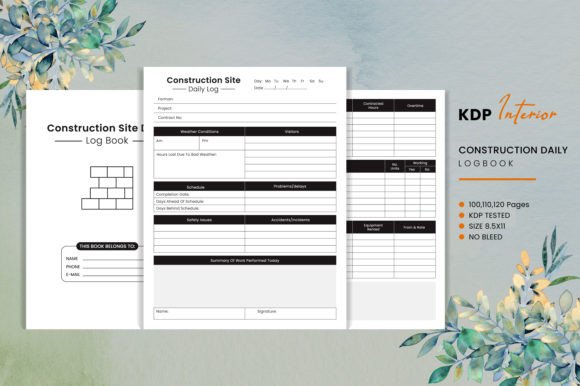
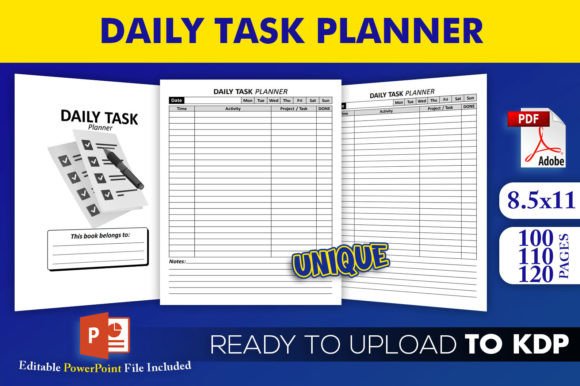
The package delivers everything you need to go from concept to a KDP-ready upload. You receive an editable source file in PowerPoint PPTX format, plus three separate PDF interiors pre-sized for KDP. The trim size is 8.5 x 11 inches with no bleed, a standard dimension that prints cleanly and works across most POD platforms. The three PDFs correspond to different page counts: 100, 110, and 120 pages. Each PDF has been tested on KDP, which means the margins, spacing, and internal structure comply with Amazon’s upload requirements.
Because the template is provided as an editable PowerPoint file, you are not locked into a static design. You can modify colors, fonts, headings, and layout elements to match your brand or the specific audience you target. The three page count options let you test different product sizes or price points without recreating the layout from scratch.
Where This Template Fits in Your Broader Workflow
The Daily Task Planner KDP Interior Template is most useful during the assembly and customization phase of your publishing process. After you have decided on your planner’s content structure and before you finalize the cover, you use the template to build the interior pages. It replaces the need to design each page individually or to learn advanced layout tools like InDesign.
If you are a publisher, the template acts as a starting point that you can apply across multiple planner projects. For example, you might use the 100-page version for a minimalist daily planner and the 120-page version for a more comprehensive edition with extra note sections. Because the source file is editable, you can reuse the same base design and simply adjust the number of pages or the orientation of certain sections.
For creators and educators who want to produce physical planners for workshops, courses, or team use, the template bridges the gap between concept and printable product. You can edit it, export a PDF, and either upload to KDP or send to a local printer. The no-bleed setting also makes it suitable for at-home printing or digital distribution.
Preparing to Use the Template: Key Factors
Before you open the PowerPoint file, clarify how you will use the planner content. Will it be a simple date-and-task layout, or do you want to include habit trackers, priority sections, or weekly reviews? The template provides a consistent daily task layout, so you should decide upfront whether you need to add extra pages for introductions, instructions, or appendixes.
One important advantage is that the interiors have already been tested on KDP. This means you do not need to worry about common rejection issues like mismatched trim size, incorrect bleed, or non-compliant margins. However, you should still verify that any customizations you make—especially font embedding or heavy image use—do not introduce new problems. Use the PowerPoint file to make changes, then export to PDF and preview it before upload.
Consider your publishing strategy. If you plan to release multiple versions of the same planner (for different months, seasons, or niches), the 100-, 110-, and 120-page options give you natural variation. You could, for instance, launch a 100-page edition at a lower price point and a 120-page edition with added content at a higher price point, all using the same template structure.
Integrating the Template with Other Tools and Platforms
PowerPoint is the primary editing environment for this template, but you are not limited to it. Because the file is a standard PPTX, you can open it in Google Slides, Keynote, or LibreOffice Impress if you prefer. The formatting may shift slightly, so always check the output PDF for consistency. For heavy customization, sticking with PowerPoint on Windows or Mac gives the most reliable results.
Once you export your final PDF, you upload it directly to KDP. The template’s 8.5 x 11 trim size with no bleed means you can also use it on other print-on-demand platforms like IngramSpark, Lulu, or Barnes & Noble Press if you adjust the trim settings accordingly. The same PDF works for digital distribution on platforms like Gumroad or Etsy, where you might sell the planner as a printable download.
For branding consistency, you can combine the template with a matching cover design. Many KDP publishers create a series of planners with the same interior layout but different cover styles. The Daily Task Planner KDP Interior Template supports this approach because the interior remains uniform while the cover changes to target different audiences.
Practical Implementation Tips and Workflow Examples
Let us walk through a realistic scenario. A freelance publisher wants to launch a daily task planner aimed at remote workers. They choose the 110-page PDF option because it provides a full quarter’s worth of daily pages with a few extra pages for goal setting. They open the editable PowerPoint file, change the title block to reflect their brand name, and adjust the color palette to a muted blue scheme that aligns with their existing products. No new pages are added; the layout stays as designed. They export to PDF, upload to KDP, and the book is live within hours. The entire customization takes less than 30 minutes.
Another example involves a small business owner who wants to create physical planners for their team. They use the 100-page version and add a custom section at the front for company values and meeting notes. Because the template is editable, they insert a few additional slides before exporting. They print the planners locally rather than through KDP, but the no-bleed 8.5 x 11 size works perfectly for office printers and spiral binding.
For long-term use, consider building a library of variations. Save the original PowerPoint file as a master template. Whenever you need a new planner, duplicate the master, adjust the page count by deleting or adding pages (while staying within the three provided layouts), and modify the branding. This approach ensures consistency across your product line and speeds up future launches.
Usability, Organization, and Efficiency
The template’s structure supports daily planning without clutter. Each day has a dedicated layout for tasks, priorities, and notes. The consistent grid helps users quickly scan their schedule. As a publisher, this uniformity also simplifies your production because you do not have to reimagine the layout for every new title.
Because the template includes three page counts, you can test which length performs best on KDP. Some audiences prefer a compact 100-page planner they can complete in a few months, while others like the heft of 120 pages. You can A/B test by launching the same design with different page counts, using the same cover and interior style, and observing which generates more sales.
Efficiency also comes from the fact that you do not need to master complex software. If you can edit a PowerPoint presentation, you can customize this template. This lowers the barrier for beginners and saves time for experienced publishers who want to focus on marketing rather than formatting.
Consistency and Quality Control
One common issue with low-content books is inconsistent spacing or missing pages. Because the template has been tested on KDP, you start with a proven foundation. After customization, run a quality check: open the PDF and scan through a random sample of ten pages. Confirm that headers repeat correctly, page numbers are present, and no content overflows the margins. Since the template uses no bleed, ensure there are no elements near the edge that might get cut off during printing.
If you plan to sell the planner as a digital download, the same PDF works without modification. Just rename it clearly and include a usage license if you wish. The high-resolution interiors ensure that print-on-demand copies look sharp, and digital copies remain readable on screens.
Long-Term Use and Scaling
The Daily Task Planner KDP Interior Template is not a one-off asset. You can use it as the backbone for a series of planners. Imagine a product line: a daily task planner for students, one for freelancers, and one for managers. Each uses the same interior layout but features different cover designs and perhaps slight adjustments to the introductory pages. The template’s editable format makes this scalable without reinventing the layout.
As you expand your catalog, the template also supports niche targeting. For instance, you could create a “Daily Task Planner for Homeschooling Parents” by changing the headers and adding a few prompts. The underlying grid stays the same, so production remains fast.
The three PDF files give you immediate options for different product lengths, which is helpful when you want to offer multiple price tiers. You can also combine them: use the 100-page version for a test run, then scale up to 120 pages once you validate demand.
Final Observations
The real value of this template lies in its ability to collapse the time between idea and publishable product. Instead of spending hours setting up margins, testing KDP requirements, and tweaking layouts, you receive a pre-validated asset that you can personalize in minutes. It is a practical tool for anyone who wants to produce a clean, functional daily task planner without technical overhead.
Whether you are a seasoned KDP publisher launching your twentieth title or a first-time creator testing the low-content book space, this template fits directly into your workflow. It handles the formatting details so you can focus on content, branding, and reaching your audience. With proper customization and consistent quality checks, it becomes a repeatable building block for a profitable and organized publishing business.