Editable Travel Planner for KDP Interiors
An editable travel planner for KDP interior offers more than just a template—it provides a flexible framework that creators, self-publishers, and small business owners can adapt to different audiences, formats, and travel styles. Whether you are launching your first low-content book or expanding a series of guided journals, understanding how to approach these interiors with intentional design can set your work apart.
What makes an editable travel planner valuable
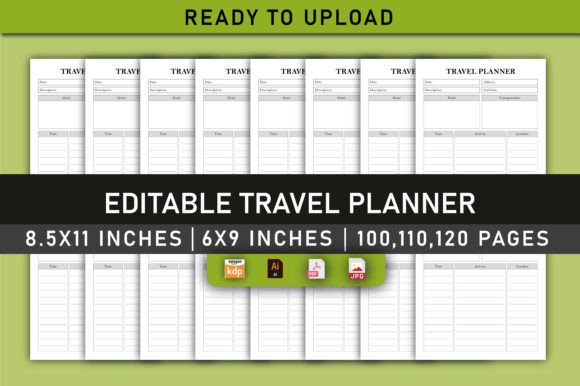
At its core, an editable travel planner gives you a structured layout that you can customize before uploading to Amazon KDP. The files typically include a print-ready PDF, source files, and specifications such as 8.5 x 11 inches and 6 x 9 inches, with page counts of 100, 110, or 120 pages. The 300 DPI CMYK color profile and no-bleed setup ensure professional print quality without unexpected trimming issues.
What makes this format especially useful is the balance between consistency and flexibility. The interior is pre-tested for KDP uploads, so you can focus on content rather than technical troubleshooting. You can adjust headings, swap out prompts, or rearrange sections to match a specific travel niche—without starting from scratch.
Creative possibilities for different audiences
A well-designed editable travel planner can serve many types of travelers. The key is recognizing that each audience needs a slightly different approach to layout, tone, and functionality.
For solo adventurers and backpackers
Solo travelers often prioritize lightweight packing, flexible itineraries, and budget tracking. You can adapt your interior by including minimalist daily spreads with space for expenses, accommodation notes, and transportation details. A section for “unplanned moments” or “local encounters” adds a personal touch that resonates with this audience. Keep the design clean and uncluttered—solo travelers appreciate pages that feel open and easy to fill in quickly.
For family trip planners
Families face a different set of challenges: managing multiple schedules, packing for children, and keeping everyone engaged. Consider adding activity logs, meal planning spreads, and a “daily highlights” section where each family member can jot down a favorite moment. The editable nature allows you to adjust line spacing or add larger writing areas for younger kids. You might also include a countdown page or a simple map section where children can mark visited places.
For couples and romantic getaways
Couples often value shared experiences and memory keeping. A travel planner for this audience can feature side-by-side pages for each person to record their own impressions, plus a shared “our best moment” box each day. Add prompts for date spots, photo location ideas, and a “things we learned about each other” spread. The warm CMYK color palette used in quality interiors helps evoke a soft, personal feel that matches the romantic tone.
Adapting the planner for different formats and platforms
The editable travel planner is not limited to a single use case. You can repurpose the same interior structure across multiple products or distribution channels, which saves time and expands your content library.
Print formats: from pocket size to letter
The provided sizes—6 x 9 inches and 8.5 x 11 inches—cover the most common KDP trim sizes for travel planners. A 6 x 9 format works well for travelers who want a compact notebook that fits in a daypack. The 8.5 x 11 size offers more room for detailed itineraries, packing checklists, and journaling space. You can create multiple variations of the same interior by adjusting margins and font sizes to suit each trim, ensuring consistency across your product line.
Digital and hybrid versions
Although the primary output is a print-ready PDF, you can also use the source files to create a digital fillable version for tablets or apps. Many creators offer both printed and digital options, allowing customers to choose based on their workflow. A hybrid approach—where the buyer prints specific pages at home—appeals to budget-conscious travelers who still want a structured planning system.
Niche variations: road trips, international travel, and staycations
You can tailor the editable travel planner to specific travel styles by swapping section headers and prompts. For a road trip edition, emphasize mileage logs, gas station stops, and rest area ratings. For international travel, include passport info pages, currency conversion tables, and a phrase translation sheet. Even staycation planners can benefit from activity lists, local attraction notes, and a “pretend we are tourists” itinerary. The original design remains the same—only the content shifts.
Practical guidance for keeping the interior clear and organized
A travel planner must strike a balance between beauty and usability. Travelers often fill out pages on the go, possibly in low light or while waiting for a train. If the layout is too complex or the type is too small, the planner becomes frustrating rather than helpful.
- Use consistent section headers so that users can find information quickly. Each major section—itinerary, packing, budget, journal—should follow the same visual hierarchy.
- Leave generous white space around prompts and checkboxes. A cramped page discourages writing, while open space invites engagement.
- Test readability at actual print size. What looks good on screen may feel crowded when printed. The 300 DPI resolution helps maintain sharp text, but font choices still matter. Stick to clean sans-serif or easy-to-read serif fonts at 10 pt or larger for body text.
- Group related functions together. Keep packing lists near the front, daily logs in the middle, and reference pages at the back. Thumb tabs or a simple table of contents can improve navigation in longer planners.
How to maintain originality while using a template
Using an editable travel planner does not mean sacrificing originality. The source files give you the freedom to add your own voice, design touches, and content focus. Here are ways to make each interior feel unique without reinventing the layout.
Customize prompts and questions
Replace generic prompts with questions that reflect your audience’s priorities. Instead of “What did you do today?” try “What moment surprised you the most?” or “Which local dish would you recreate at home?” Personalized prompts turn a standard planner into a conversation between you and the user.
Add themed icons or simple graphics
Small visual elements—a suitcase icon for packing sections, a map pin for destinations, a camera for photo logs—add personality without overwhelming the page. You can use simple line art that prints cleanly in grayscale if the user chooses black-and-white printing. The CMYK color specification means the template works with full color as well, so you have room for subtle accent hues that reinforce the travel theme.
Include inspirational quotes or local tips
Scatter a few short travel quotes or practical tips throughout the planner. A line like “The best journeys answer questions that you didn’t even ask” on the first page or a tip about packing a reusable water bottle near the packing list adds depth. These small touches make the planner feel curated rather than generic.
Practical recommendations for creators and publishers
If you are planning to publish a travel planner on KDP, the editable format gives you a head start. The files are already tested for upload, so you can bypass the common pitfalls like missing bleed settings or wrong color profiles. Here are a few recommendations based on working with similar interiors.
- Start with one size and page count to test market response. The 8.5 x 11 inch, 110-page version is a safe starting point because it offers enough content without feeling bulky.
- Create a series by producing variations for different travel styles using the same base layout. Consistency across your catalog helps build brand recognition.
- Include a “how to use this planner” page at the beginning. Many buyers appreciate guidance on getting the most out of the sections, especially if they are new to structured travel planning.
- Offer a preview that shows a few sample pages so potential buyers can see the layout density and design style. Clear previews reduce returns and increase confidence in the product.
Adapting for different contexts and platforms
Beyond KDP, you can use the same editable travel planner as a lead magnet for a travel blog, a bonus for a travel course, or a printable product on platforms like Etsy or Gumroad. The print-ready PDF works as-is for digital downloads, while the source files let you tweak colors or branding for different audiences. For bloggers, offering a free planner section as a sign-up incentive can build an email list of engaged travelers.
Entrepreneurs who run travel agencies or tour companies can brand the planner with their logo and use it as a gift for clients. Educators teaching travel writing or cultural studies might adapt the journaling sections for classroom exercises. The versatile structure supports multiple business models without requiring design skills from scratch.
Balancing inspiration with practical structure
A travel planner should inspire action, not just admiration. The most effective interiors create a clear path from planning to reflection. When you design or customize a planner, think about the user’s journey: they start by brainstorming destinations, move to logistics and packing, experience the trip while logging daily notes, and end by summarizing memories. Each section should flow naturally into the next, with no abrupt gaps or confusing jumps.
The editable travel planner for KDP interior gives you the scaffolding to build that journey. By adjusting sections, tones, and additional prompts, you can serve audiences from spontaneous solo travelers to meticulous family organizers. The underlying structure remains reliable—tested for print, optimized for clarity, and ready for your creative input.