YouTube Video Planner: Organize Your Content
What Makes a Video Planner a Game-Changer?
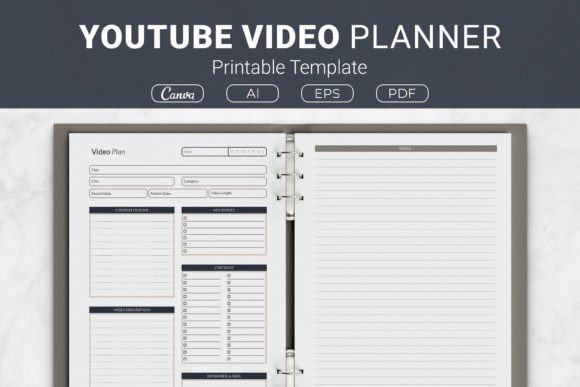
Creating a YouTube video involves more than just hitting record. From outlining key points to optimizing your description with the right tags, the process can quickly become scattered. The YouTube Video Planner Printable Template brings all those steps into one structured place. It includes sections for a content outline, checklist, video description, keyword tags, and notes, so you never lose track of an idea again. Whether you are just starting out or have a growing channel, this template can help you save time, produce better videos, and keep your creative energy focused on what matters most.
Who Benefits from a Structured Video Planner?
The beauty of the YouTube Video Planner is that it adapts to different workflows. A new creator might use it to build confidence in their planning process, while a seasoned professional may rely on it to streamline production across multiple projects. Educators who produce tutorials can use the checklist to ensure they cover every learning point, and business owners can treat it as a pre-production tool for maintaining brand consistency. Even hobbyists who upload once a month find that having a dedicated planner reduces the friction between an idea and a finished video.
Beginners: Building a Repeatable Workflow
If you are new to YouTube, the most intimidating part can be figuring out where to start. The template acts like a guide. You fill in your content outline, list the key points you want to cover, and check off items as you go. This repetition turns planning into a habit. For example, a beginner gamer might use the template to plan a walkthrough series: they can jot down the game chapters to highlight, note the commentary beats, and draft a description that includes timestamps. Over time, this structure helps them post consistently without forgetting important details like end screens or calls to action.
Ease of use is the top priority for most beginners. The PDF comes ready to print in US Letter or A4, and there are also Canva template links for those who prefer to edit digitally. You don’t need complicated software—just a printer or a free Canva account. The six-by-nine and seven-point-five by nine-point-two-five-inch sizes also fit well into standard binders, so you can keep all your video plans in one place.
Experienced Creators: Speed and Flexibility
For creators who already have a rhythm, time is precious. The YouTube Video Planner saves effort by eliminating the need to reinvent your planning system every week. Instead of toggling between a notebook, a spreadsheet, and a dozen browser tabs, you have a single sheet that captures the entire video lifecycle. An experienced tech reviewer, for instance, can quickly fill in the outline for a new gadget comparison, list the three key features to compare, and add relevant keywords for SEO—all before starting the shoot.
Flexibility matters here. The template includes an open-source AI Illustrator file and an EPS file, meaning you can tweak the design to match your personal brand. You can change colors, add your logo, or rearrange sections. This customization is especially valuable for creators who produce content under a specific aesthetic or who collaborate with editors and want a consistent brief.
Professionals, Marketers, and Small Business Owners
Professionals who use YouTube for business—such as marketers, freelancers, and small business owners—need more than just creative planning. They need to align each video with a strategy. The planner’s keyword tags and description sections double as mini SEO checklists. A marketing consultant, for example, can outline a video about email automation, then use the tags section to note high-volume keywords like email marketing tips and automation tools. They can also draft a description that includes a link to a lead magnet, turning each video into a conversion tool.
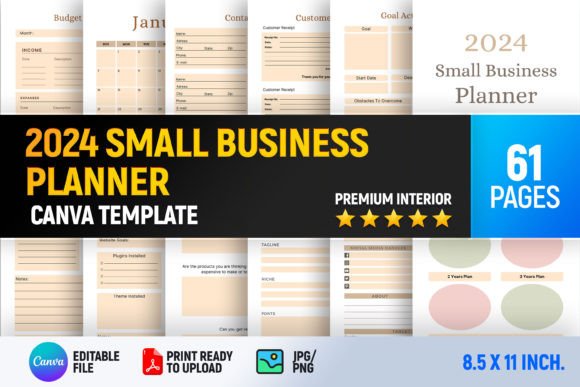
Reliability and commercial value are key. Because the template comes in formats compatible with Kindle Direct Publishing (KDP), a business owner can also repurpose the interior design to create and sell their own planner on Amazon. The AI, EPS, PDF, and Canva files give you the right to modify and use the design commercially, making it a low-risk investment for publishers who want to test a new product niche.
Educators and Tutorial Creators
Educators often focus on clarity and learning value. The template’s outline and key points sections allow you to structure a tutorial logically. A music teacher planning a lesson on chord progressions can list the chords in order, note finger placements, and add a call to action to download a practice sheet. The checklist helps ensure they haven’t skipped a crucial step, like showing the fretboard or explaining a concept in plain language. For online course creators, the planner can serve as a script outline that keeps each video tight and goal-oriented.
Hobbyists and Casual Users
Not everyone on YouTube wants to grow a channel—some just enjoy sharing a passion. For hobbyists, the template adds a layer of fun without turning planning into a chore. A cook who posts a recipe video every few weeks can use the notes section to jot down ingredient substitutions or filming tips. They can print the PDF in A4, slip it into a binder, and revisit it when inspiration strikes. The low cost (often just the price of paper and ink) makes it an accessible tool for anyone who values organization but doesn’t want to invest in paid software.
Publishers and KDP Sellers
If you are involved in print-on-demand or Kindle Direct Publishing, the YouTube Video Planner has immediate commercial value. The package includes four file formats—AI, EPS, PDF, and a Canva template—so you can customize the interior and upload it to KDP without hiring a designer. The sizes available (US Letter, A4, 7.5x9.25, and 6x9) cover the most popular trim sizes on Amazon. You can create a low-content book that targets YouTubers searching for planning tools. Because the design is minimal and functional, it appeals to a broad audience of creators, educators, and professionals.
Evaluating the Template Against Your Own Needs
Before choosing any planner, it helps to ask yourself what you value most. Is it ease of use? Then the ready-to-print PDF and Canva link are your best friends. Is it creativity? The editable Illustrator file gives you full control over the layout. Do you care about long-term usefulness? The template’s sections are timeless—outline, checklist, description, tags, notes—so you can use the same system for years.
Consider your skill level. Beginners will appreciate the guided layout. More experienced users might tweak the sections or combine them with a calendar. If you are a professional managing a team, you could print several copies for collaboration. The template is lightweight enough to serve as a sprint planning sheet for a video production pipeline.
Also think about the formats. The 6x9 inch size is portable and fits in a purse or camera bag—perfect for creators who film on location. The US Letter and A4 layouts offer more room for writing, which is helpful if you like to brainstorm in detail. The Canva template allows digital editing and easy sharing with a virtual assistant.
Practical Example: A Week in the Life
Let’s walk through how a freelance graphic designer might use the planner. On Monday, they choose a topic: “How to Design a Logo in Canva.” They fill the outline with introduction, three design principles, a live demo, and final tips. Under key points, they write one sentence per step. The checklist reminds them to record a screen capture, add b-roll of their process, and include a button to a free template. They draft a description that includes “Canva logo design tutorial for beginners” and add keyword tags like logo design, Canva tips, branding. The entire planning session takes fifteen minutes. On Tuesday, they film, following the checklist. By Thursday, the video is edited and uploaded. Without the planner, they might have forgotten to mention the free template or missed a key point—details that affect viewer retention and engagement.
Is It Right for You?
If you have ever felt overwhelmed by the number of steps in a single video, the YouTube Video Planner Printable Template offers a simple, low-pressure solution. It fits creators who prefer pen and paper as well as those who work digitally. It respects your time by centralizing all planning tasks, and it respects your budget with a one-time purchase that includes multiple file formats and sizes.
For educators, the checklist ensures no lesson element is overlooked. For business owners, the keyword and description sections support your marketing goals. For KDP publishers, the open-source files are a ready-made product interior. And for beginners, the template is a gentle introduction to professional video planning without the learning curve of software.
The template does not promise quick growth on its own—no planner can. What it offers is a reliable structure that helps you show up prepared. When you know exactly what you need to film, write, and share, you free up mental energy for creativity and audience connection. That is the real value of a good planning tool.
Getting Started
The package includes an AI Illustrator file for custom design, an EPS file for compatibility with other vector programs, PDF files ready to print in four sizes, and a linked Canva template for instant digital editing. Whether you are planning your first video or your hundredth, having a consistent format reduces decision fatigue. Download, print, or edit—choose the method that feels most natural. The YouTube Video Planner is designed to work the way you work, not the other way around.