Address Book for Business Contacts KDP: A Practical Tool for Professional Contact Management
Managing business contacts effectively is a skill that separates organized professionals from those who lose opportunities in a sea of scattered notes. For entrepreneurs, small business owners, freelancers, and consultants, a reliable system for storing client and partner information is not just convenient—it is essential. The Address Book for Business Contacts KDP offers one such system, providing a customizable and print-ready template designed to help professionals centralize their contact data in a structured format. But how does it compare to other approaches, and what factors should you consider before adopting it? This article examines the template in detail, explores its strengths and limitations, and helps you decide whether it fits your specific workflow.
Understanding the Address Book for Business Contacts KDP Interior
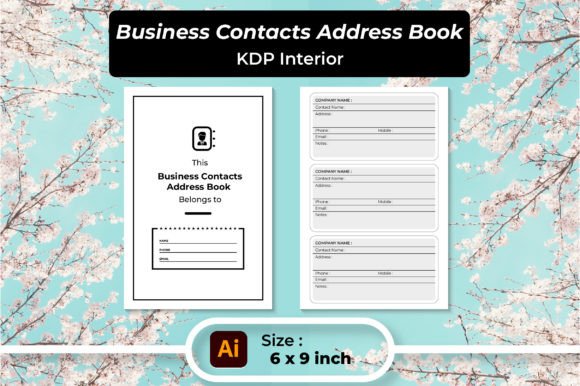
At its core, this KDP interior is a pre-designed address book template intended for use with Amazon’s Kindle Direct Publishing platform. However, its utility extends beyond publishing: you can use it as a digital planner on a tablet or laptop, or print it out as a physical notebook. The template includes multiple file formats—editable Adobe Illustrator (AI) and EPS vector files, SVG and PNG images, high-resolution JPGs, and two PDF files (one 120-page version and one 100-page version). The pages are sized at 6×9 inches with 300 DPI resolution, making them suitable for professional printing or digital annotation.
The layout uses a table format to organize entries. Each row typically includes fields for the contact’s name, phone number, email address, and physical address. This straightforward structure leaves little room for confusion: you fill in the blanks, and your contact list becomes uniformly readable. The fact that the source files are editable means you can adjust column widths, add or remove fields, change fonts, or modify the color scheme to align with your brand or personal preference.
What distinguishes this product from a generic notebook or a simple spreadsheet is the balance between flexibility and structure. It offers a dedicated space for business contacts without requiring you to design the layout from scratch. You receive a framework that is immediately useful, yet you retain control over its appearance and content.
Comparing the Address Book Format with Digital and Analog Alternatives
To evaluate whether the Address Book for Business Contacts KDP is the right choice, it helps to compare it with the three main categories of contact management: fully digital tools (CRM software, apps, spreadsheets), traditional paper address books, and hybrid solutions like customizable templates.
Versus CRM Software and Contact Management Apps
Customer relationship management (CRM) platforms such as Salesforce, HubSpot, or even lightweight apps like Google Contacts offer powerful features: search, filtering, automated reminders, integration with email and calendars, and the ability to track interactions over time. For professionals managing hundreds of contacts or needing advanced analytics, a CRM is often the right tool.
The Address Book for Business Contacts KDP does not compete with these systems on automation or data analysis. Its strength lies elsewhere. It provides a simple, offline-friendly, and visually clear format that does not require a subscription, internet access, or a learning curve. If your contact list is modest in size and your primary need is quick reference rather than complex relationship tracking, the template may be more practical than over-engineering the task with a full CRM.
Versus Traditional Paper Address Books
Standard paper address books are widely available and inexpensive. Their main advantage is immediacy: you open the book, write a name, and you are done. However, they lack flexibility. You cannot rearrange entries, add custom fields, or change the layout after printing. If your business categories evolve, you are stuck with the original design.
The customizable KDP interior addresses these shortcomings. Because you can edit the source files before printing, you can reorganize sections (for example, grouping contacts by industry, region, or account type), add fields like social media handles or notes, and choose a font size that works for your eyesight. You also have the option to print only the pages you need, or to update the file as your contact list grows and reprint a new version—something a traditional bound address book cannot offer.
Versus Generic Spreadsheet Templates
Many professionals default to Excel, Google Sheets, or Airtable for contact management. Spreadsheets are powerful: they support sorting, filtering, conditional formatting, and even basic CRM functionality through formulas. However, they are not always the most user-friendly for quick lookups, especially if you are not a spreadsheet expert. The risk of accidentally editing or deleting data also exists, and printing a spreadsheet in a readable, booklet-like format often requires manual formatting.
The Address Book for Business Contacts KDP provides a print-optimized, human-readable layout that is more intuitive for quick scanning than a dense grid of cells. For someone who prefers a tactile reference or wants a printed backup to a digital system, the template offers a more polished output than a typical spreadsheet printout.
Strengths and Practical Applications
The template shines in several specific scenarios:
- Small business owners who meet clients in person — When you are at a trade show, a networking event, or a client’s office, flipping open a dedicated address book can be faster and more professional than fumbling with a phone or tablet. The printed version is always on and never runs out of battery.
- Entrepreneurs who maintain a moderate contact list — If you interact regularly with 50 to 300 contacts, a printed or digital address book can serve as a reliable central directory without the overhead of a complex database.
- Professionals who work offline frequently — For consultants, field service providers, or anyone who travels to areas with limited internet connectivity, a printed address book is a dependable fallback. You can also keep the PDF on a device for offline digital use.
- Users who prefer analog planning but want customization — Many people find writing by hand helps with memory and focus. This template allows you to enjoy those cognitive benefits while still controlling the layout and design.
Limitations and When to Consider Alternatives
No tool is perfect for every situation. The Address Book for Business Contacts KDP has clear limitations that may make it unsuitable for some professionals.
Limited scalability. If your contact database grows into the thousands, a printed or static digital file becomes cumbersome. Searching for a name requires manual scanning, and updating a single entry means editing the file and reprinting the entire book. At that scale, a CRM with instant search and bulk editing is far more efficient.
No built-in backup or sync. A printed address book can be lost or damaged. A digital PDF can be accidentally overwritten. Unlike cloud-based contact managers, this template does not automatically sync across devices or create version histories. You must be disciplined about backing up your file.
Manual data entry. If you already have contacts in a spreadsheet, a phone, or another address book, transferring them to this template will require manual effort. There is no import function. For a one-time migration, this may be acceptable, but if you update contacts frequently, the manual entry becomes a recurring chore.
Minimal collaboration features. If you work in a team and need multiple people to access and update the same contact list, a shared digital tool is far more practical. The KDP interior is designed for individual use.
Decision Factors: How to Choose the Right Approach
Your choice should depend on three factors: the size of your contact network, your preferred workflow, and your need for mobility versus integration.
- If you have under 200 contacts and prefer a tangible reference — The customizable address book template is a strong candidate. You can create a clean, professional directory that sits on your desk or fits in your bag.
- If you have over 500 contacts or need advanced filtering — A digital tool with search and categorization capabilities will save you time. Consider a CRM or a database.
- If you want a hybrid approach — Use the template as a printed backup while maintaining a digital spreadsheet as your live system. This gives you the best of both worlds: a quickly accessible physical reference and a searchable digital master list.
- If you need to share contacts with a team — Skip the template and use a shared cloud-based solution. Collaboration and version control are critical when multiple people need access.
Realistic Use Case Examples
Consider a freelance graphic designer who works with about 50 clients, plus a network of printers, copywriters, and photographers. The Address Book for Business Contacts KDP could be printed and kept in a portfolio bag. When a client calls and the designer is at a coffee shop without Wi-Fi, the printed book provides immediate access to contact details, project notes, and billing addresses. The designer might also keep the editable PDF on a tablet, using a stylus to add notes during client meetings.
Contrast this with a real estate agent who manages hundreds of past clients, prospective buyers, lenders, inspectors, and contractors. For the agent, a CRM with search, tag filtering, and integration with an email client is almost mandatory. The manual address book would become a bottleneck, not a productivity tool.
A third example: a consultant who works mostly from a home office but travels quarterly for conferences. They might use the template as a digital planner on a laptop, typing in contacts after each event. The clean table format helps them review names and organizations quickly before follow-up calls. When traveling, they print a current copy to slip into a carry-on.
Customization and Format Flexibility
One of the template’s less obvious advantages is its adaptability across different media. Because you receive the files in multiple formats, you are not locked into a single use case:
- Print it as a coil-bound or perfect-bound book using the included PDF files. You can take it to a local print shop or print at home.
- Use it digitally on a tablet with apps like GoodNotes, Notability, or Adobe Acrobat Reader. The 300 DPI resolution ensures the text remains crisp even when zoomed.
- Edit the source files in Adobe Illustrator or a vector editing program to customize the layout completely. You could change column widths, add a notes section, or reorganize the page structure to match your specific business categories.
This flexibility makes the template suitable for a wide range of professional contexts, from a solo freelancer’s field reference to a small office’s shared directory printed once a quarter.
Understanding the Investment and Effort
Using the Address Book for Business Contacts KDP requires an initial time investment: downloading the files, opening the editable formats, adjusting the design to your taste, and either printing or loading the digital version onto your device. If you want to use it as a printable book, you also need to consider binding options—spiral binding, ring binder, or saddle stitching—which adds a modest cost and a bit of planning.
Compared to the recurring subscription fees of many CRM platforms, the one-time purchase of this template is economical. However, the real cost is the ongoing labor of maintaining the data manually. For those who enjoy the ritual of writing or typing entries and who value privacy and simplicity over automation, that labor is not a burden—it is a feature.
Final Considerations for Informed Decision-Making
The Address Book for Business Contacts KDP is not a universal solution, and it does not claim to be. It is a specialized tool for a specific use case: professionals who need a clear, customizable, and either printable or digital-friendly contact organizer without the complexity of a full CRM or the rigidity of a pre-printed address book. It works best for those who manage a moderate number of contacts, value design flexibility, and want a reliable offline reference.
If your needs align with those conditions, the template offers a practical middle ground between analog simplicity and digital customization. If your workflow requires automation, large-scale data management, or real-time team collaboration, a different approach will serve you better. Evaluating your own contact volume, frequency of updates, and preferred medium will guide you to the right choice—whether that is this template, a dedicated app, a spreadsheet, or a combination of several tools.
Organizing business contacts is ultimately about reducing friction in your daily work. The right system is the one you will actually use and maintain. The Address Book for Business Contacts KDP provides a well-structured foundation that many professionals will find suits that purpose well.