Cosmos Notepad Templates for KDP Publishing
Notepads remain one of the most versatile products in the self-publishing space. They serve as daily companions for writers, planners, sketch artists, and anyone who values putting thoughts onto paper. The challenge lies in creating a notepad that feels intentional rather than generic. That is where Cosmos Notepad Templates enters the picture, offering a complete interior solution that balances structure with creative freedom. Whether you are uploading your first notebook to Amazon KDP or expanding an existing product line, these templates provide a solid foundation without forcing you into a rigid mold.
What Makes Cosmos Notepad Templates Interesting
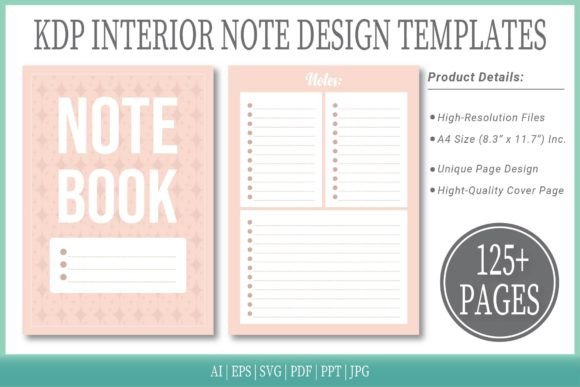
The value of a notepad template set goes beyond simple page layouts. What makes these templates worth exploring is the combination of ready-to-upload files and editable source formats. You receive 125 pages in a clean A4 size with no bleed, which means you can focus on content and cover design rather than spending hours setting up margins and trim lines. The availability of six format types—AI, EPS, SVG, PDF, PPT, and JPG—gives you flexibility whether you work in vector software, presentation tools, or print-ready environments.
Including a cover page adds a finishing touch that many standalone interior templates lack. This small detail can save you time when preparing your final manuscript for KDP review. The templates are designed for adults aged 20 to 50, but the uncluttered layout appeals to a wider audience. If you are a designer, marketer, blogger, educator, freelancer, or small business owner, the structure supports both professional and personal projects without looking overly corporate or childish.
Creative Applications Across Different Audiences
One template set can serve many purposes depending on how you present it. Cosmos Notepad Templates work well for creators who want to launch a series of themed notebooks. You can keep the interior consistent and change only the cover design for each variation. This approach helps you build a cohesive brand while giving customers options to choose from.
For Freelancers and Small Business Owners
A simple lined or dot grid notepad becomes a client meeting log, project tracker, or brainstorming pad. The A4 size offers enough space for notes without feeling bulky. You can brand the cover with your logo or a minimalist design that reflects professionalism. Freelancers who sell digital products on Etsy or Gumroad can also repurpose these templates as printable planners, to-do lists, or journal inserts.
For Educators and Hobbyists
Teachers and workshop leaders often need printed materials for participants. The no-bleed format ensures clean edges when printed at home or at a local shop. You can create course handouts, reflection journals, or idea logs for creative writing sessions. The PPT format is especially useful if you want to add prompts or questions before converting to PDF. Hobbyists who enjoy bullet journaling or scrapbooking can use the dot grid pages as a base for custom layouts.
For Marketers and Content Creators
Branded notepads make thoughtful giveaways or client gifts. With the editable vector files, you can insert a subtle logo watermark on each page or design a cover that aligns with your brand colors. Bloggers can create free downloadable resources for their audience, building email lists while offering practical value. Podcasters and YouTubers often use branded notebooks for show notes or episode planning, and these templates provide the structure to produce those in bulk.
Adapting the Templates for Different Goals
The beauty of starting with a complete interior is that you can focus on the creative decisions that matter. Instead of worrying about page counts, trim sizes, or file compatibility, you can experiment with different cover styles, paper types, and usage scenarios. Here are several ways to adapt the same template set for distinct products.
Create a Series of Themed Notepads
Choose a theme such as travel, gratitude, goal setting, or daily reflection. Use the same interior for all titles, but design unique covers for each theme. This method builds a product family that encourages repeat purchases. Customers who buy one notepad often return for others in the same series because they trust the layout and quality.
Offer Both Digital and Print Versions
Since you receive PDF, PPT, and JPG formats, you can sell the notepad as a printable digital download and as a print-on-demand physical book. The digital version appeals to customers who want to print pages as needed, while the physical version targets those who prefer a bound notebook. This dual approach expands your reach without requiring additional design work.
Customize for Niche Audiences
Not all notepad buyers want the same thing. Some prefer wide-ruled lines for large handwriting, while others want a dot grid for drawing. With the editable AI and EPS files, you can adjust the line spacing, add headers, or include motivational quotes on each page. Niche products often perform well on KDP because they face less competition and attract highly motivated buyers.
Practical Recommendations for Best Results
Working with templates is straightforward, but a few practical steps can help you maintain consistency and avoid common pitfalls. The goal is to deliver a product that feels complete and professional from the moment a customer opens it.
Choose the Right Format for Your Workflow
If you are comfortable with Adobe Illustrator or Affinity Designer, the AI and EPS files give you full control over every element. If you prefer a simpler approach, the PDF interior is ready to upload directly to KDP with no edits required. The SVG files work well for web-based design tools, while PPT allows last-minute text changes before export. Pick the format that matches your skill level and time available.
Test Your Cover Design with the Interior
The cover page included in the set can serve as a placeholder, but you will likely want to create your own cover to match your brand. Before uploading, print a test copy or use KDP Previewer to check that the spine width aligns with the page count. A mismatch between cover and interior can lead to returns or negative reviews.
Keep the Layout Consistent
Because the templates include 125 pages, you have room for a table of contents, introduction page, or section dividers if you choose to add them. However, avoid cluttering the interior with too many extra elements. A clean notepad is more versatile than one packed with decorative borders or heavy graphics. Let the content and the user's purpose take center stage.
Keeping Your Content Clear and Organized
Clarity matters more than decoration in a notepad product. Customers buy notepads to write, draw, plan, or reflect. If the layout distracts or restricts them, they will look for alternatives. The Cosmos Notepad Templates follow a minimal approach that respects the user's space. You can maintain that clarity by focusing on a few key principles.
First, choose a page style that matches your intended audience. Lined pages work best for writers and note-takers. Dot grids appeal to bullet journalists and designers. Blank pages suit sketchers and brainstormers. The template set probably includes one or more of these styles, so decide which one fits your product concept before customizing.
Second, pay attention to margins and gutter space. A4 size without bleed gives you a clean border, but you still need enough inner margin to prevent text from disappearing into the binding. The templates already account for this, so avoid shifting elements too close to the center.
Third, use consistent header styles if you add section titles or page numbers. Small touches like page numbers at the bottom or a subtle line separating note areas improve the user experience. These details make the notepad feel like a finished product rather than a generic fill-in-the-blank template.
Bringing Your Product to Market
Once your notepad is ready, the next step is presentation. Write a product description that highlights the number of pages, format options, and potential uses. Mention the A4 size, no-bleed setup, and cover design so customers know what to expect. If you offer multiple variations, list them clearly in the description or use Amazon's variation feature to group them.
Consider publishing a series of three to five notepads at once to create a storefront that looks established. Customers are more likely to trust a seller who offers multiple titles than one with a single product. You can also run promotions or bundle deals to encourage trial purchases.
Finally, stay open to feedback. Buyers may request different page styles, larger or smaller sizes, or specific themes. Use their input to refine your next release. The templates give you a repeatable foundation, so you can iterate quickly without starting from scratch each time.
Final Thoughts
Cosmos Notepad Templates offer a practical starting point for anyone entering the KDP notepad market or expanding an existing product line. The combination of ready-to-upload interiors and editable source files saves time while leaving room for creative decisions. By focusing on your audience's needs, testing your cover and interior alignment, and maintaining a clean layout, you can produce notepads that feel intentional and useful. Whether you are a first-time publisher or an experienced creator looking for efficiency, these templates support the kind of consistent, audience-friendly products that perform well in a competitive marketplace.